GENESISCODE DOCTOR AI
A four-stage build-readiness workspaceREAL PRODUCT
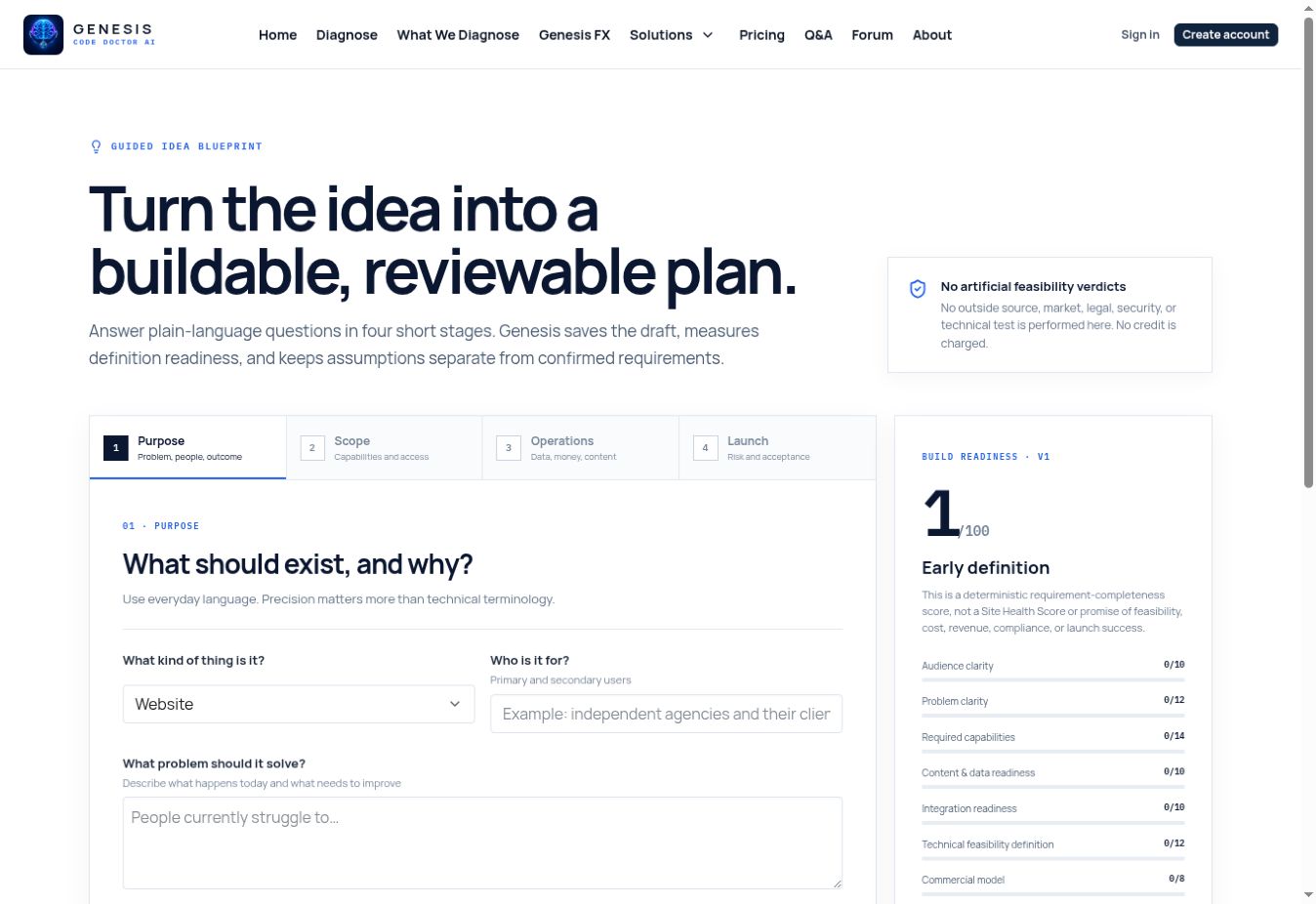
Build-an-Idea Blueprint app interface
GENESIS PRODUCT VIEWBuild-an-Idea Blueprint
4guided planning stages
100definition-readiness scale
CLEARassumptions stay labeled

Purpose, scope, operations, and launch details become a structured blueprint while assumptions stay visibly separate from confirmed requirements. This is the real published Genesis interface—not a stock image.

FREE PLANNING TOOL

Genesis Code Store · GCD-PLAN-008

Build-an-Idea Blueprint

Turn a rough idea into requirements another builder can review.

Turn a website or digital-product idea into an assumption-labeled requirements blueprint with launch criteria.

AVAILABLE NOWFree

Online tool No checkout required

What it helps you do

  • Assumption-labeled product requirements
  • Launch criteria and implementation boundaries
  • An organized planning blueprint you can revisit
GUIDED PLANNING WORKFLOWIt organizes the build; it does not build or repair the product.
PlanningRequirements
Describe an idea Free Genesis tool. No payment information required.
PRODUCT DETAILS

What this specific product actually does

Every Genesis listing has its own capabilities, workflow, automation status, limits, and proof standard—without generic promises copied from another product.

CAPABILITIES

Inside Build-an-Idea Blueprint

  • 01Guides the idea through purpose, scope, operations, and launch stages.
  • 02Captures the intended audience, problem, outcome, and required capabilities.
  • 03Separates confirmed requirements from assumptions that still need a decision.
  • 04Reviews data, integrations, access, monetization, and operational needs.
  • 05Builds launch and acceptance criteria into the plan instead of leaving them implied.
  • 06Produces a structured blueprint that can be revisited before technical implementation.
GUIDED PLANNING WORKFLOW

It organizes the build; it does not build or repair the product.

The readiness score changes as you complete the guided requirements. No application code is generated, deployed, or automatically modified.

Four guided stagesAssumptions remain visibleNo automatic build
AUTOMATIC REPAIRNot enabled

This product does not modify a customer website.

PRODUCT FIT

Who this is built for

  • 01Founders turning a rough concept into a reviewable product brief
  • 02Nontechnical creators preparing clear instructions for an AI builder or developer
  • 03Teams resolving scope, data, access, and launch assumptions before coding
DELIVERY

How you receive it

Listing Code

GCD-PLAN-008

Format

Interactive planning blueprint

Compatibility

All Platforms

Cost

Free

This listing is a free online tool, not a downloadable code package. It opens on Genesis Code Doctor after this product overview.

HOW TO USE IT

Three steps for this product

  1. 01

    Describe the purpose

    Explain what should exist, who it serves, and what problem it solves.

  2. 02

    Define the boundaries

    Work through capabilities, access, data, integrations, operations, and launch needs.

  3. 03

    Review the blueprint

    Resolve labeled assumptions and use the criteria to guide a future build.

IMPORTANT BOUNDARY

What this item does not claim

The blueprint organizes a plan; it is not a built application or proof of implementation feasibility.

DOWNLOADABLE CODE POLICY

Simple delivery when verified code is released

Free code uses Free Download. Paid code uses Add to Cart. Every released package includes a verified ZIP and START-HERE directions.

CONTINUE EXPLORING

Every suggestion below is another real, published Genesis tool or reference.

FREE REFERENCE

Diagnostic Directory

Know exactly what Genesis can check before relying on a result.

View product

START HERE

Full Website Diagnostic

See the public evidence before you decide what to repair.

View product
FREE REFERENCE

Website Repair Guide

Understand the issue, the repair approach, and the proof required.

View product